syGlass Winter 2026 Release: v2.6.0
Although it comes on the heels of our last feature release less than three months ago, syGlass v2.6.0 has no shortage of new content to help create new workflows and streamline old ones. Read on to see what’s new, check out the full changelog, and of course don’t hesitate to send us a message to get a new license, to renew an old one, or to ask any questions you might have.
Support for Sony’s Spatial Reality Display
syGlass has always been about taking advantage of the human visual system to make sense of 3D data in the way we’re used to digesting 3D information: with stereoscopic depth cues. For years, this has been predominantly the realm of virtual reality (VR).
Sony’s Spatial Reality Display (SRD) offers a glasses- and headset-free alternative that is now integrated with syGlass, powering breathtaking experiences that can be engaged with at a glance. syGlass v2.6.0 adds an option to connect to the Sony ELF-SR2.
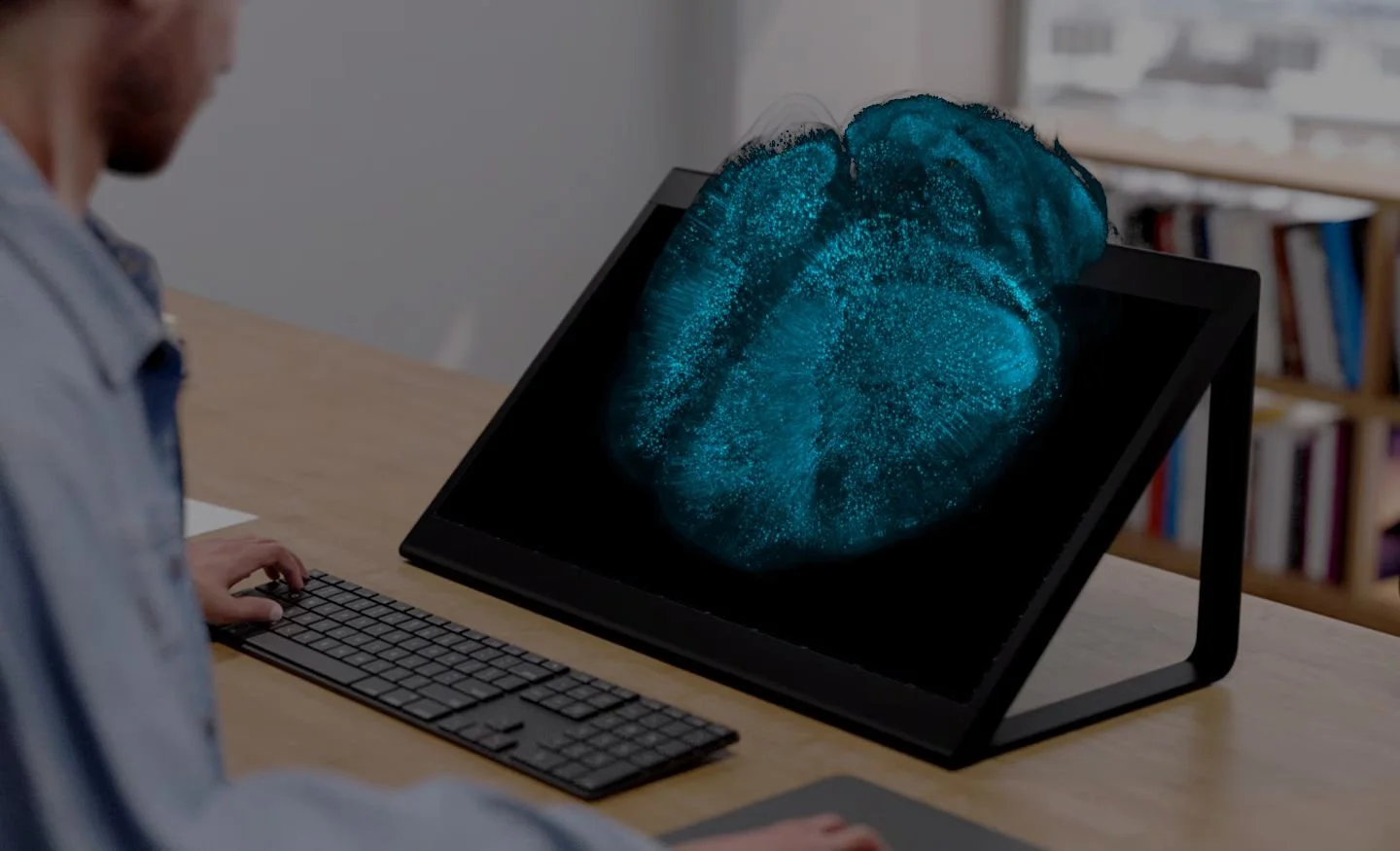
A simulated render of a light sheet image of a mouse brain on the Spatial Reality Display. The light sheet image data are courtesy of Chih-Weir Logan Hsu, PhD, Baylor College of Medicine. (https://doi.org/10.7554/eLife.77419)
If you’re interesting in taking advantage of this integration, get in touch with us to purchase a display and for support in getting started. Instructions for connecting syGlass and the SRD can be found on our dedicated landing page for this collaboration. Our intention is to deepen the integration in future releases this year.
Direct Reading & Streaming of OME-Zarr Image Data
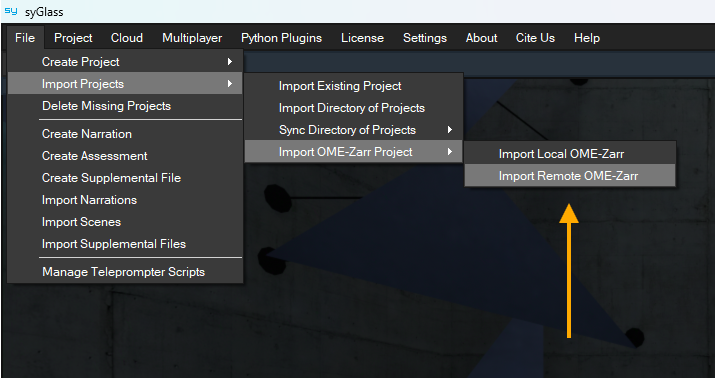
The location of the options for direct reading and streaming of OME-Zarr files in the syGlass UI, marked with a gold arrow.
There are many file formats available for storing microscopy and tomography data, and syGlass supports quite a few of them. OME-Zarr has recently become a popular choice. Last year, syGlass responded by adding support for creating syGlass projects from local OME-Zarr data. Two challenges remained:
Many OME-Zarr files are stored in the cloud, not locally, and are accessed via S3 URIs or HTTPS URLs
Creating syGlass projects from OME-Zarr data duplicates the images and can require a lot of storage capacity
Now, in syGlass v2.6.0, most OME-Zarr files can be read directly from disk or streamed from S3 URIs or HTTPS URLs without the need to create a copy of the data as a syGlass project. To get started with this approach, simply import your OME-Zarr files from a location on disk, or specify the S3 URI or HTTPs URL of your remote OME-Zarr data, using the options shown in the image above.
Brush Tool for Partitioning Surfaces
Use of the new in-VR brush tool for partitioning a surface and creating separate surfaces based on the partitions.
Partitioning polygonal surfaces into different parts can be a tricky task, but it’s also one that’s especially well-suited for VR. 3D controls allow one to easily select regions of a targeted surface, and stereo viewing supports more intuitive navigation of the spatial relationships in the scene.
The Edit Surfaces tool now has a “brush mode” capable of both deleting faces from a surface and of painting partitions onto the surface, allowing it to be exported into separate OBJ files. See the video clip above or check out the full tutorial for more information on this new feature.
In-VR Keyboards and Numpads
Adjusting the lower threshold value of a syGlass project using the new numpad for text entry.
The VR environment has many advantages for viewing 3D image data, but text entry is typically not one of them. There are a situations where you might want to use a keyboard in VR: entering specific values for visualization settings or assigning a name to a segmentation mask, for example. Now, as an alternative to using Whisper-enabled voice transcription for these tasks, an in-VR keyboard and numpad option have been added for your convenience.
Ability to Save Tool Loadouts
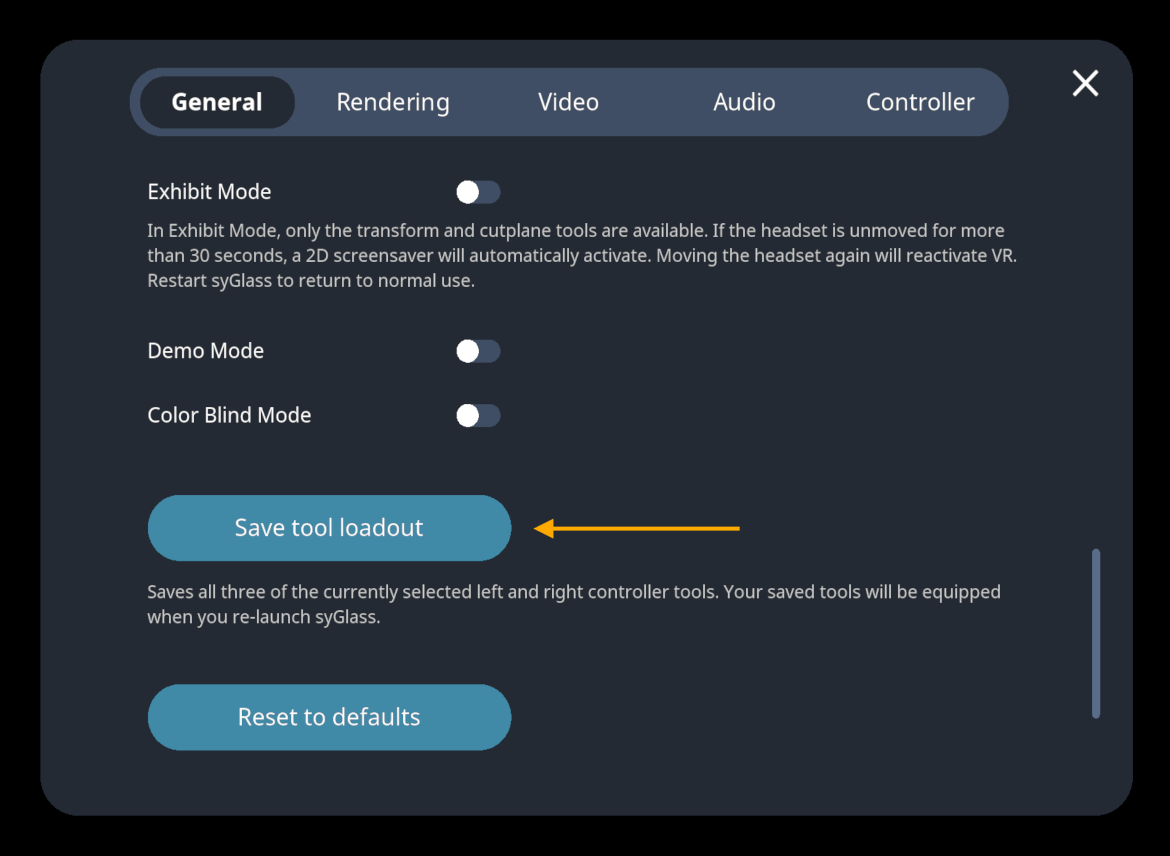
The location of the “Save tool loadout” option within the “General” tab of the in-VR settings menu, marked with a gold arrow.
Frequent users of syGlass tend to have a few tools that are used again and again, and assigning these tools to controllers each time syGlass is used can be a time sink. A new button in the “General” tab of the in-VR settings menu allows you to save the currently assigned three tools to each controller, so that they’ll be waiting for you next time you use syGlass.
… and Lots More
Plenty of smaller changes are arriving in v2.6.0 as well: the ability to use saved custom color assignments for masks in VR, options to select channels from imported IMS and OME-Zarr files with high channel counts, bug fixes and optimizations, and lots more. You can read about it all in the full changelog, and then get in touch with us when you’re ready to give it a try.
In just a few months, we’ll deliver another tranche of exciting new features and tools in syGlass v2.7.0—stay tuned!